 ORION
The free game launcher that tells you how to set up your games for your PC.
ORION reads your PC and tells you what to play, with which settings, at what price. All your games in one place, what your machine can run game by game, outdated drivers, and the real best price.
Free, no account, no ads. Version 2.9.1 for Windows 10 and 11, on the Microsoft Store. Interface in English, French, Spanish, German, Italian and Brazilian Portuguese.
Seven stores, and nobody to tell you what your machine can do.
A PC gamer today has Steam, Epic, GOG, Ubisoft Connect, the EA app, Battle.net, the Microsoft Store, and a few games dropped in a folder by hand. Nobody knows what is installed anymore, or where. And with every new game, the same ritual: open the options, guess what each slider costs, look for a guide, test, start over. Meanwhile the 180 Hz display runs at 60 and the graphics card uses half of what it can do.
ORION does not replace Steam or Epic. It sits on top of them, reads your machine, and does the thinking.
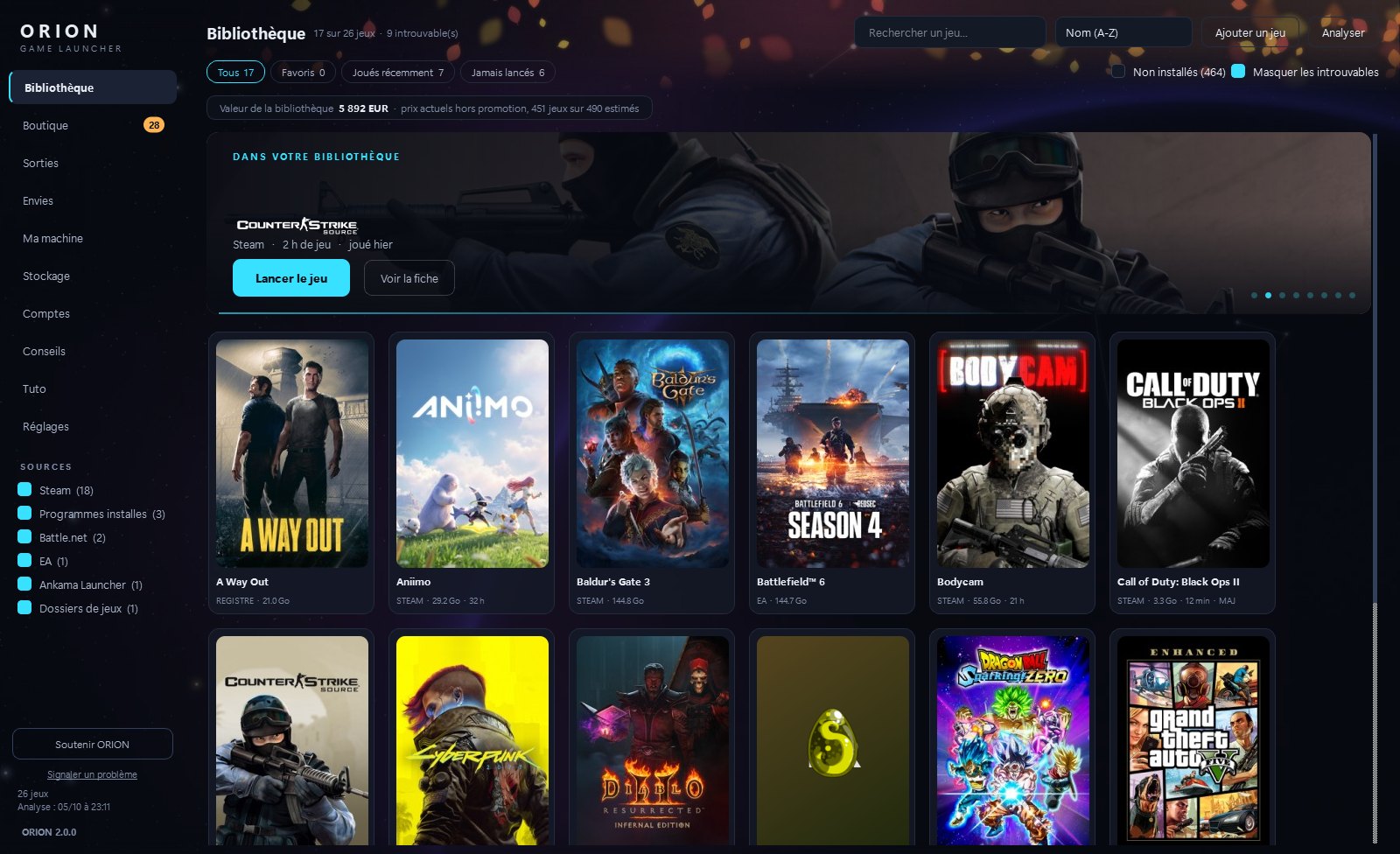
One library. Steam, Epic Games, GOG, Xbox, Ubisoft, EA, Battle.net and Ankama games found on your drives, plus the ones you own but haven't installed. One click to play; the owning launcher starts if the game needs it.
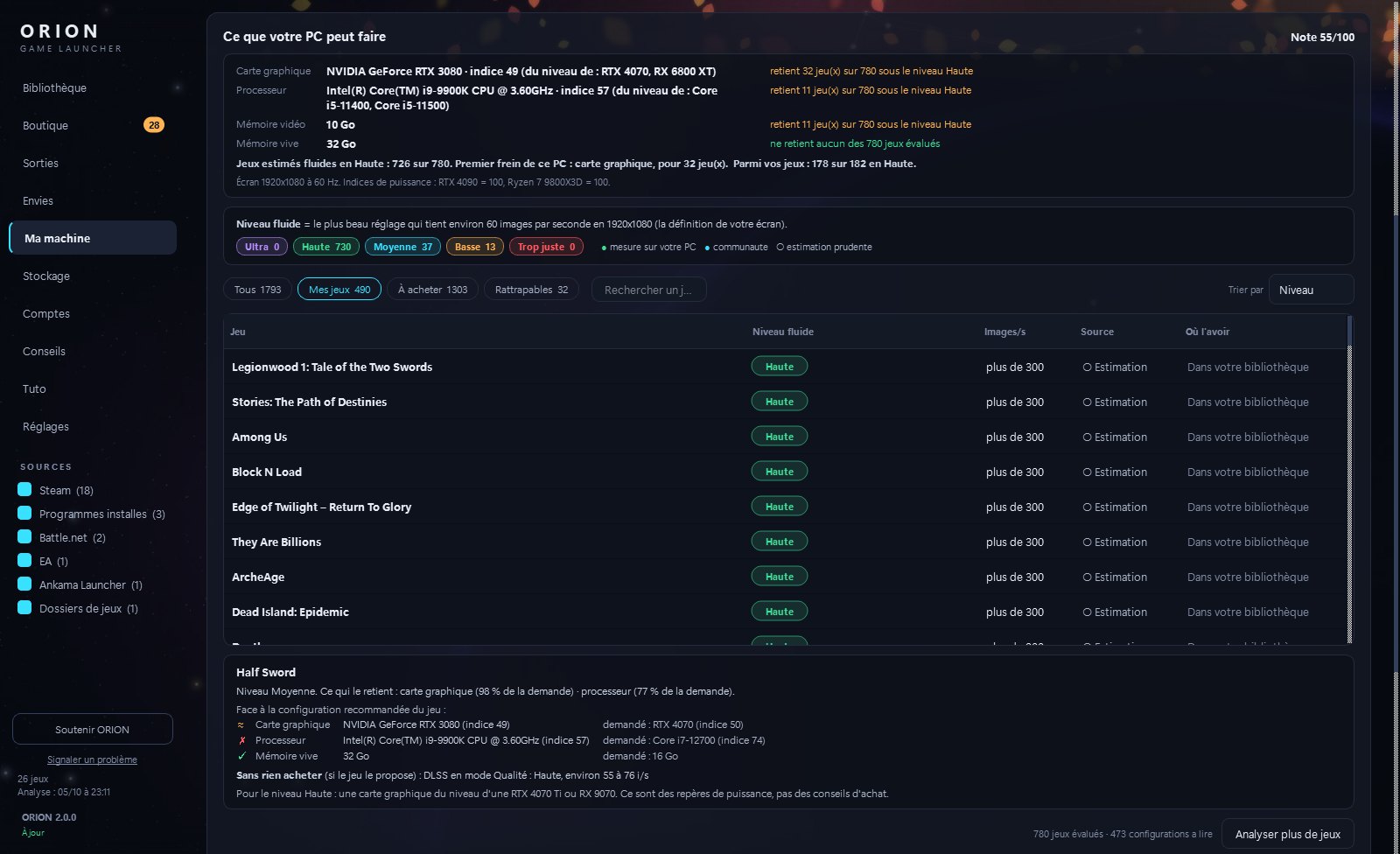
What your PC can run, game by game. For each game, the highest settings level that stays smooth on your hardware and the expected frame rate, estimated from the publisher's requirements, corrected by real measurements shared by players with a similar graphics card, and by your own measurements once you play.
The right settings, line by line. ORION works out each game's graphics settings for your card and your display, and shows you what to pick in the game's menu, line by line, in plain words. It no longer writes into game files: many games rewrite them at launch, so the game saves your choice itself.
Real prices, done properly. Thirty-plus approved stores compared (IsThereAnyDeal data), the free games of the moment, a wishlist that warns you when a game drops. Every offer sits in one list, cheapest first: official stores, authorized resellers and long-proven key resellers (Instant Gaming, Kinguin, Loaded), with a visible rule (a recent price, a Steam key, Global region or your own country's, never "gift" or "account" keys). At the same price, an official or authorized store comes before a key reseller.
The big upcoming releases, on PC and consoles, with their countdowns.
Your PC, in one minute. Right after the first install: how many of your games run at High quality, how many drivers need an update, what your library is worth, and whether wishlisted games dropped in price. An image to share ("My PC runs 38 of my 52 games at High quality") is one click away.
The right drivers, by hardware ID.
ORION identifies every chip by its hardware ID, not by its translated name. It checks what Windows Update offers as optional drivers, knows the latest NVIDIA version for your card series, and, on a Dell, Lenovo or HP PC, reads the manufacturer's driver catalog for your exact model — the same source Dell Command Update, Lenovo System Update and HP Image Assistant use. The advice names the version you have, the version published for your model, its date, and the official page.
ORION only says "newer version available" when a source proves it, and it never installs a driver itself: you keep control.
What ORION does not do.
No account to create. No ads. Nothing sent without your consent: a single question, asked once, lets you share anonymous performance measurements and an anonymous usage counter — and if you say no, ORION works exactly the same. Your games, your files, your name: none of it leaves your PC. The page What ORION sends lists everything.
No cheats, no "boosters", no registry tricks. ORION never writes into game files, and it never touches your other launchers' libraries.
Where the money comes from.
ORION is free. It is funded by donations and by partner links to some stores: if you buy after clicking one, the store may pay the author a commission. The price you pay is the same; offers are sorted from lowest to highest price; at an equal price, official and authorized stores come before key resellers, and within each group a partner link comes first. No paid placement, ever.
ORION+ is an optional subscription (€1.99 a month or €14.99 a year through the Microsoft Store, 7-day free trial): it adds the in-game display, the mini ORION on a second screen and Xori live, with her AI. Nothing ORION already does becomes paid.
Install ORION.
- Open ORION's page on the Microsoft Store and click "Get".
- Start ORION from the Start menu. No administrator rights needed.
- ORION reads the machine and finds your games. Allow about fifteen seconds the first time.
New versions come through the Microsoft Store; library, settings and backups are kept. Uninstall from Windows' "Installed apps". Installed ORION from this site before? That version keeps working but no longer receives new versions: install the Microsoft Store one.
How much is your Steam library worth?
Paste your Steam profile link: the value of your games, your hours played, and what your never-launched games are worth. Plus an image to share.
Join the community.
A question about a setting, a bug, an idea: on ORION’s Discord you talk directly to the author and other players. New versions and the week’s free games show up there on their own.

Questions.
Does it work with my games?
If they come from Steam, Epic Games, GOG, Xbox, Ubisoft, EA, Battle.net or Ankama, or sit in a folder you add, yes. ORION works out the right settings for your PC and your display, and tells you what to pick in the game's own menu, line by line. It never writes into game files.
Will it break my games?
No. Since version 2.2, ORION never writes into game files: it reads your PC, works out the right level and tells you what to pick in the game's menu. If an older version wrote into a game, "Reset to default settings" puts it back. With an NVIDIA card, the "NVIDIA driver" line of the game page changes the game's profile in the driver when you click, and "Restore previous settings" puts your values back. Play mode sets Windows up while you play and puts everything back afterwards.
Does it install drivers?
No. It tells you which driver is outdated, which version is published for your hardware, and gives the official page. You decide.
Is it really free?
Yes: everything ORION does is free, with no locked features. ORION+ is optional (€1.99 a month or €14.99 a year, 7-day trial) and only adds the in-game display and Xori live. Donations and partner links fund it; prices never change for you, and no store pays for its place.
What does it send?
Nothing identifying, and nothing at all without your consent. See What ORION sends.
Why does the Store say "Uses all system resources"?
The Microsoft Store says it for every classic Windows app, like Steam or Discord: ORION reads your hardware and game folders and launches your games, which a sandboxed app cannot do. It asks for no administrator rights, and what it changes on your PC is listed in What ORION sends.
Is the French site the same?
The French site has more: 1,100+ game pages with "can it run on my PC", release calendar, driver pages by PC model, version journal. The app itself is in English (Settings > Language).